

Key takeaways:
- Start your domain name registration by searching for an available domain name and testing variations if your first choice is taken.
- Follow a simple process with a trusted domain registrar to register your domain, choose the right settings, and complete your purchase.
- Protect your domain long term by enabling automatic domain renewal and adding privacy protection to keep your information secure.
Building a brand for your online business starts with one simple step: securing your domain name. It’s the address people use to find your website, and it plays a big role in how professional and credible your business looks online.
If you’re wondering how to register a domain name, the process is more straightforward than it might seem. Whether you’re a first-time site owner, a creator launching something new, or a small business expanding beyond social media, getting your domain in place is a practical first move.
While the exact checkout flow can vary depending on the registrar you choose, the core steps stay the same. In this guide, you’ll learn how to choose the right domain name, check its availability, register it through a domain registrar, and set it up for your website and business needs.
Register your domain and start your online journey
Find the right name for your business and register it through a trusted provider in just a few steps.

What it means to register a domain name
Domain registration is the process of reserving a web address through a domain name registrar for a set period, usually one year or more. Once registered, that domain name is tied to you or your business, so others can’t use it while your registration is active.
A domain name registrar is the company that manages domain name registrations and keeps your domain linked to your account. The registrant is the person or business that owns the domain rights during that registration period. As long as your details are active and accurate, you maintain control over how the domain is used.
Domain registration isn’t permanent. It’s valid only for a set period, so you’ll need to renew it before it expires to keep ownership. Most registrars offer automatic renewals and domain expiration protection to help prevent accidental loss of your domain.
You can explore the following guide for a deeper breakdown of how registrars, registries, and registrants work together.
Before you register a domain name
Before you start the domain registration process, it helps to have a few basics ready. You don’t need a finished website yet, but having a clear direction will make checkout faster and help you make better decisions along the way.
Here’s a quick checklist to guide you:
- Business name ideas: Have your preferred name ready, plus a few backup options in case your first choice isn’t available.
- Contact info: You’ll need to provide basic details during registration, including your name, email, and business information.
- Payment method: Most registrars require payment up front for the registration term you choose.
- Basic plan for your website: Think about how you’ll use the domain. This could include building a website, setting up a professional email, or connecting it to hosting later.
Remember, you don’t need to launch a full website before securing a domain. In fact, registering a domain is one of the first things you’ll do when building a business website.
When you’re ready to build your site, this video walks through how our AI website builder can help you get started.
Choose a name that fits your brand
Your domain should match your business name and be easy for people to remember, spell, and share. Short and simple names tend to work best, especially for first-time visitors.
Start with your preferred name, then list a few variations or possible domain names in case your first choice is already taken. If you’re stuck, you can use our AI Domain Generator to explore ideas based on your business name or keywords. For more tips, check out this guide on choosing the right domain name.
Decide what you need with your domain
A domain is just the starting point. Think about what you’ll need to connect to it once it’s registered.
- Hosting: This is where your website files live, and you’ll need a web hosting service to get your site online.
- Professional email: A domain-based email (like [email protected]) makes your business look more credible.
- Privacy protection: This keeps your personal contact info from being publicly visible in domain records.
- Security features: Some registrars offer add-ons that help protect your domain from unauthorized changes.
Having a basic plan for these early on makes it easier to choose the right setup during registration.
How to register a domain name in five steps
The process for registering a domain name is straightforward. While every domain registrar has its own checkout flow, the core steps for domain registration are generally the same.
In this section, we’ll walk you through how to register a domain name step by step, using Network Solutions as an example. This will give you a clear idea of what to expect when you search for a domain, choose your options, and complete your purchase.
By the end, you’ll know how to check availability, select the right setup, and verify your domain so it’s ready to use for your website or business.
- Check whether your domain name is available
- Choose the right domain extension
- Select a trusted domain registrar
- Add your registration details and choose your settings
- Purchase and verify your domain registration
Step 1: Check whether your domain name is available

Start by searching for your chosen domain name using our domain name checker. This is where you’ll quickly find out if your preferred name is available or already taken.
If your exact-match domain name isn’t available, don’t worry. This is common, especially for shorter or more popular names. Instead of starting over, try small variations. You can adjust your wording, add a relevant keyword, or explore different domain extensions to find an available domain name that still fits your brand.
As you search, keep your original idea in mind but stay flexible. Testing a few options will help you secure a domain that’s both available and aligned with your business.
Find the perfect domain
Ready to register a domain name? Check domain availability and get started with Network Solutions today.
Step 2: Choose the right domain extension
While choosing your preferred domain name or looking for an available one, take time to choose the right domain extension as well. These are the endings like .com, .net, or .org, also known as top-level domains (TLDs).
For most businesses, .com is still the most widely recognized and trusted option. If it’s available, it’s usually a safe choice. If not, common alternatives like .net or .store work well, especially if they match your brand or purpose.
You can also explore more specific domain extensions depending on your business. Industry-specific options (like .io or .design) or country-code TLDs (like .us or .uk) can make sense if you’re targeting a local audience or want a more niche identity.
If you want to explore more options, you can browse our available domain extensions to find the one that fits your brand.
Step 3: Select a trusted domain registrar
After choosing your domain name and extension, the next step is selecting a reliable domain registrar to complete your registration. A domain registrar is the company that manages your domain.
Trusted registrars are accredited by the Internet Corporation for Assigned Names and Numbers (ICANN), the organization that oversees global domain registrations. This accreditation helps ensure your domain is handled securely and follows standard practices. You can learn more about how ICANN works in this separate article.
When choosing your registrar, look beyond just the initial price. Compare key factors like renewal terms, customer support, and add-ons. Features like our Domain Privacy + Protection, Trademark Protection, and Expiration Protection can make a difference in how your domain is managed and protected over time.
Taking time to evaluate your chosen registrar helps you avoid issues later and gives you more control over your domain as your business grows.
Step 4: Add your registration details and choose your settings
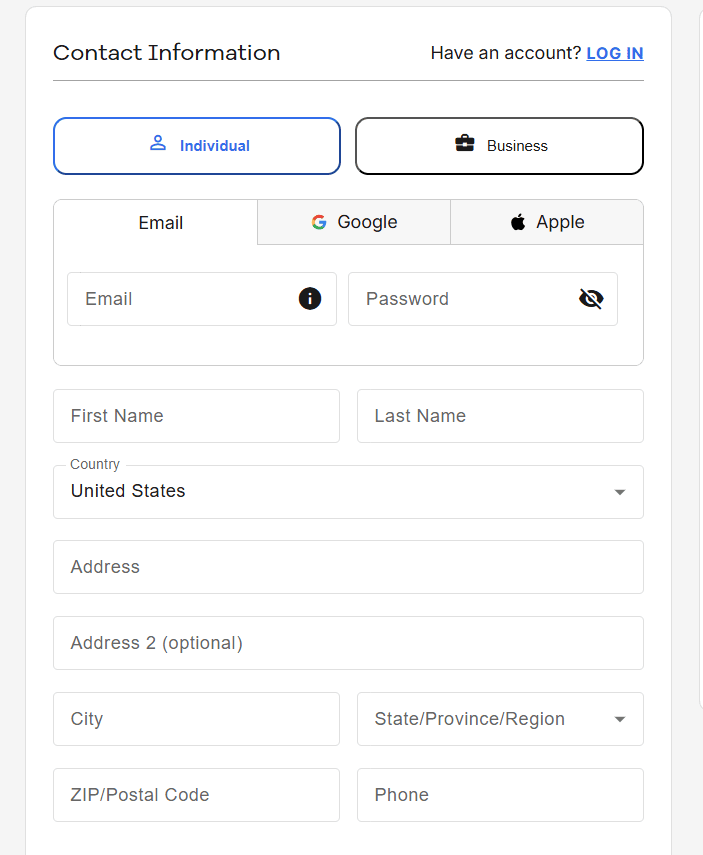
Once you’ve selected your domain, you’ll be asked to enter your registration details and configure a few basic settings. This step is where your domain gets officially tied to you as the registrant.
Start by providing your contact info, including your name, email, and business details. This information is used for domain ownership records, so it’s important to keep it accurate and up to date.
Next, you’ll choose your privacy and management settings. Most registrars offer privacy protection as an add-on to the domain name to keep your personal details from being publicly visible.
You’ll also see options related to name servers, which connect your domain to your website or hosting provider. If you already have a DNS provider or hosting plan, you can point your domain to it using your domain provider’s DNS settings pane.
In our case, you can manage your DNS records in your Network Solutions account after completing the registration under Domains > Advanced Tools.
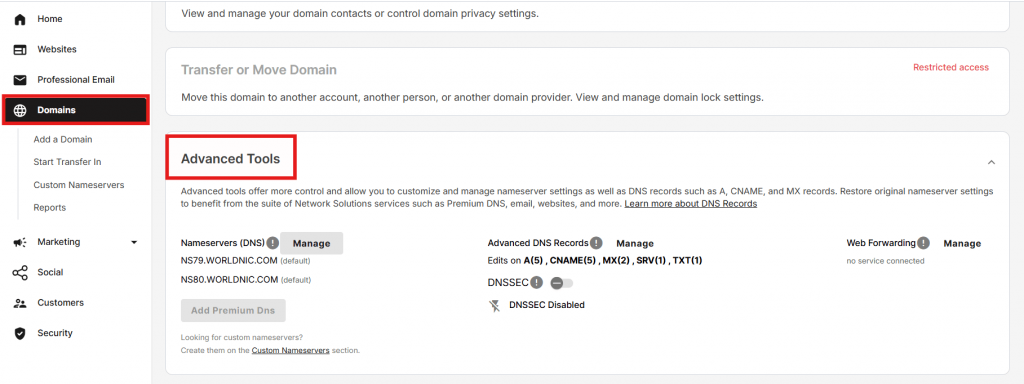
Finally, look for the option to enable automatic domain renewal. This ensures your domain stays active without interruptions.
Step 5: Purchase and verify your domain registration
Once you’ve reviewed your details and settings, the final step is to complete your purchase. You’ll pay for your domain based on the registration term you selected, ranging from 1 to 5 years.
After checkout, your registrar will send a verification email to confirm your contact details. It’s important to open this email and follow the instructions to verify your domain registration. This step confirms that you’re the rightful registrant.
Your domain is now officially registered, but it’s not permanent. Since domains are reserved for a set term, you’ll need to continuously renew them before they expire to keep ownership. To avoid interruptions, it’s a good idea to enable settings that automatically renew your domain.
For added peace of mind, you can also explore options like domain privacy and protection, which help secure your registration and keep your personal details safe. With these in place, you can focus on building your website or business without worrying about losing your domain.
What happens after you register a domain name
Once your domain is registered, you’ve secured your online address. The next step is putting it to use. This usually involves connecting your domain to a website, setting up a professional email, and enabling features that support your security and long-term management.
You don’t need to do everything at once, but having a clear path helps. Whether you’re launching a new website or preparing your domain for future use, these steps will help you turn your domain into a working part of your business.
- Connect your domain to your website or hosting
- Set up a domain-matching email address
- Enable privacy and protection features
Connect your domain to your website or hosting
To publish content online under your domain name, you’ll need to connect it to a hosting service through a hosting provider. Your web host stores your website files on servers, and your domain helps direct visitors to those servers when they enter your address.
This is typically done by updating your domain’s DNS settings to point to your hosting provider’s servers. If you already have hosting, you can ask your hosting provider for the DNS details and your domain provider for the directions on how to link it. If not, you can set this up later once your website is ready.
Also, if you bought the hosting service and domain from the same provider, there’s usually no need to update your DNS settings, as your provider will automatically configure them during registration.
However, Michael Chattan, Senior Director of Domain Operations at Network Solutions, warns that “if you’ve purchased your domain and hosting separately at different providers, it complicates things,” and recommends you “avoid doing so at all costs.”
Set up a domain-matching email address
A domain-based email address adds a professional touch to your communications. As Anthony Matera, Senior Director of Email Products at Network Solutions, explains, “an email address tied to your domain significantly boosts professionalism, trustworthiness, and brand recognition,” making your business appear more established to customers and partners.
Some domain and hosting providers offer professional email as an inclusion with your domain purchase, while others sell it as a separate service.
When setting this up, Matera recommends prioritizing security and reliability, noting that “when connecting to email, prioritize security by using encrypted connections (SSL/TLS), setting strong passwords, and enabling multi-factor authentication (MFA).”
If you’re ready to set one up, this step-by-step guide shows you how to create an email account with your domain name.
Once set up, you can use a more professional email address for your day-to-day business communications.
For an in-depth guide on post-domain purchase, read our guides:
Set up an email that matches your domain.
Set up a domain-based email that strengthens your credibility and keeps your communication secure, reliable, and on brand.

Enable privacy and protection features
After registration, it’s a good idea to review your domain’s security settings. Domain privacy or WHOIS privacy keeps your personal contact details from being publicly visible in domain records.
Without privacy protection, your information can be accessible through public databases. If you want to understand how this works, you can explore how WHOIS records work. Enabling these settings helps protect your domain and reduces unwanted contact or potential misuse.
Why it matters to choose the right registrar and settings
Choosing the right registrar matters because it affects how easily you can manage, protect, and maintain your domain over time.
A reliable registrar gives you consistent, secure access to your account, clear renewal terms, and dependable support when you need help. This becomes significant as your business grows and your domain becomes a key part of your online presence.
Settings also play a big role in long-term convenience. Features like automatic domain renewal help prevent your domain from expiring unexpectedly, while domain privacy protects your personal information from public view. Together, these settings reduce risk and give you more control over your domain.
Taking the time to choose the right registrar and properly configure your settings can save you from unnecessary issues later. It ensures your domain stays secure, accessible, and aligned with your business as it evolves.
Frequently asked questions
Domain prices usually start around $10–$20 per year, but some registrars offer discounts as low as $1 for the first year. The cost depends on the domain extension (like .com, .tech, or .design) and whether the domain is already owned. Keep in mind that renewal prices are often higher than first-year deals.
If you forget to renew your domain, it won’t vanish right away—but it will stop working. Most registrars give you a short grace period to renew it. If you miss that window, someone else could buy it. To avoid losing your domain, turn on auto-renewal or use Domain Expiration Protection.
Not for most domains. You can register global extensions like .com, .net, or .org from anywhere. But country-specific domains (like .uk or .ca) may require you to live in or have a presence in that country.
No, you can’t edit a domain name once it’s registered. If you want a different name, you’ll need to register a new domain name.
Not usually. Domains are paid yearly, but some hosting companies include a free domain for the first year when you buy a hosting plan. Just remember to check the renewal cost you’ll pay after the first year.
You can register a domain for up to 10 years at a time, depending on the registrar. Most people start with 1–2 years, then renew as needed. Enabling auto-renewal helps make sure you don’t lose it by accident.
Some domains cost more because they’re highly brandable or in demand. These are called premium domains, and prices can range from a few hundred to thousands of dollars depending on demand.
A domain name is your web address, like yourname.com. Hosting is the service that stores your website files and makes them visible online. You need both to run a website. Some companies offer domain and hosting as a package.
Yes, you can register more than one domain, and many businesses do. Having multiple domains can help protect your brand, secure common variations of your business name, or support different campaigns and products. It also gives you flexibility as your business grows or expands into new areas.
No, you don’t need hosting to register a domain. You can secure your domain first and decide how to use it later. Hosting becomes relevant when you’re ready to build a website. Your web host is what stores your site and makes it accessible online.
WHOIS privacy, also known as domain privacy or privacy protection, keeps your personal contact details from being publicly visible in the WHOIS database. Without it, your name, email, and other information can be accessed by anyone. It’s useful if you want to protect your privacy and reduce your exposure to spam, phishing, or any unwanted contact.
Yes, you can transfer your domain to another registrar if needed. The process is straightforward, but rules and timing can vary depending on your current registrar and how long you’ve owned the domain. It’s worth reviewing the transfer process in advance so you know what to expect.
Secure your domain and move your business forward
Registering a domain name might seem like a small step, but it sets the foundation for everything that follows. When you break the process down, it’s manageable. You choose a name, register it through a trusted provider, and set it up to support your website and business goals.
The important part is taking action. A good domain doesn’t stay available for long, and waiting too long can mean losing a name that fits your brand. Securing your new domain early gives you control and keeps your options open as you build your website.
If you’re ready to move forward, the next step is simple. Search for your domain, register it, and start putting it to work for your business.
Find the perfect domain
Ready to register a domain name? Check domain availability and get started with Network Solutions today.